AI-powered B2B order intake

Turn chat, email, and spreadsheet orders
into one review queue

StackCube collects B2B orders from chat, text, email, PDFs, spreadsheets, and order pages, then uses AI to organize order lines and item candidates so your team reviews only what needs confirmation.

Have complex customer pricing or order formats?

Sample customers, SKUs, and pricing included · No card required · See the order queue in 5 minutes

AI Order Intake
Customer Orders Organized Today

TypeCustomerOrderStatus
ChatHangil Trading12 linesOrganized
TextDaesung Corp.Text orderReview
EmailSeoul MarketPDF orderSKU match
ExcelIncheon Logistics38 linesPending
Order PageBusan FoodsRepeat orderPending
Chat · Textorder intake
AI Cleanuporder candidates
Price Matchcustomer pricing
Shipping CSVcarrier export
AI Order Review

Review and approve
AI-organized order candidates

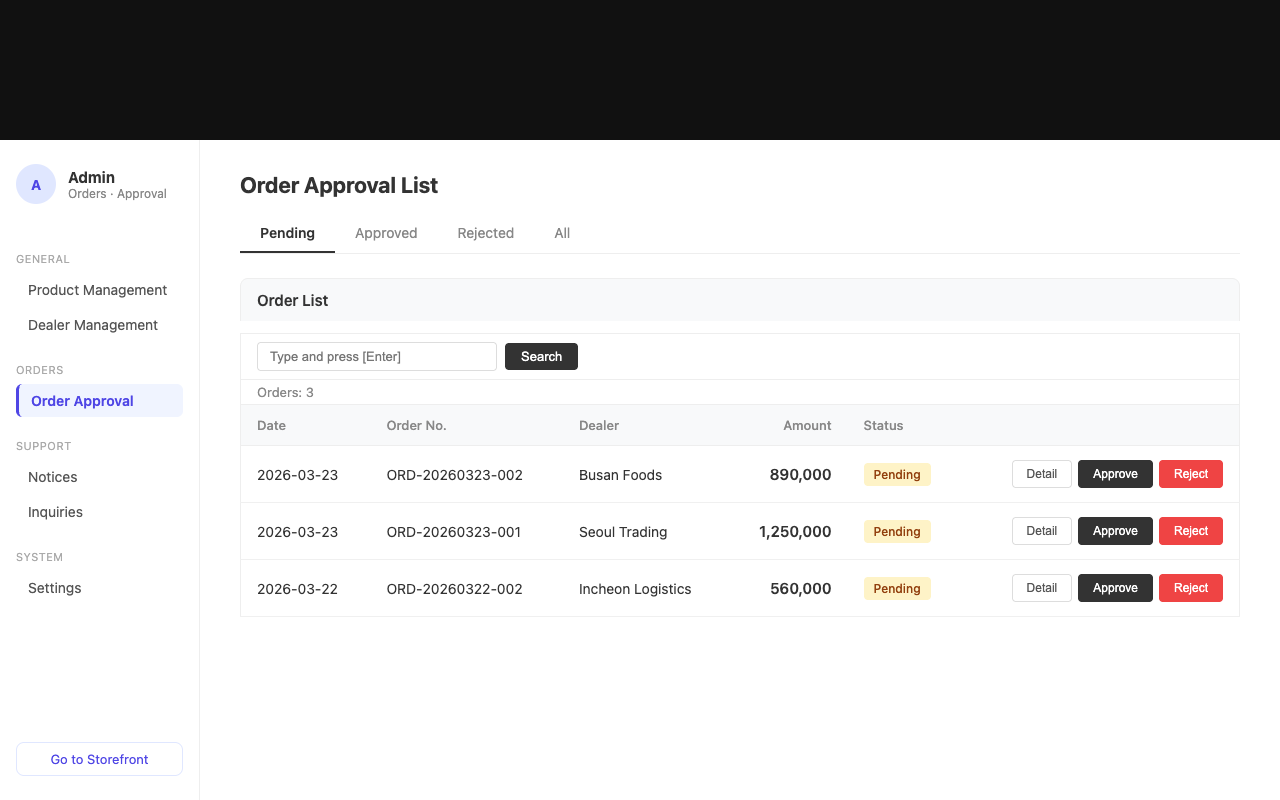
Admin screen for reviewing and approving AI-organized order candidates
The Problem

Manual work starts
as soon as orders arrive

Every customer has a preferred way to order. StackCube does not force a new channel first; it turns scattered orders into one operating workflow.

01

Chat, text, and email orders are scattered by owner

When orders are split across people and channels, missed orders, duplicates, and delays follow.

02

PDF and spreadsheet orders are read and re-entered manually

Manual interpretation creates SKU, quantity, and request-detail mistakes.

03

Item names and prices differ by customer

The same item can have different customer names, prices, or special terms.

04

Carrier upload files are rebuilt after approval

Approved orders still need to be converted into carrier-specific CSV formats.

Built for These Teams

For operations teams receiving
customer orders in many formats

If repeat B2B orders arrive by chat, text, email, files, and order pages, the operating problem is the same.

Teams receiving chat, text, and email orders

For teams that need messages and emails organized into one review queue.

  • Reduce missed orders by person or channel
  • Keep channel history tied to each order

Distributors receiving Excel and PDF order forms

For teams that need to read different customer formats and turn them into order candidates.

  • Convert files into order details
  • Process file orders in the same flow

Teams managing customer pricing and carrier files

For teams with customer-specific prices, special terms, and recurring carrier upload work.

  • Check customer-specific pricing during order review
  • Reduce carrier CSV preparation after approval
Use Cases

The same order problems repeat
across many B2B industries

Different industries, similar ordering structure. If your team receives repeat customer orders, StackCube can fit your workflow.

Apparel · Fashion
Frozen · Chilled Foods
Food Service · F&B
Cosmetics · Beauty
Fire Safety · Industrial
Electronics · IT Parts
Consumer Goods
Building Materials
Order Channel Management

Turn each customer's preferred channel
into the same review workflow

Some customers order by chat, others by text, email, PDFs, spreadsheets, or a dedicated order page. Intake channels can differ while AI cleanup, SKU and price review, approval, and carrier CSV export follow the same standard.

CustomerOrder ChannelLatest OrderStatus
Hangil TradingChat12 lines / $1,120Organized
Daesung Corp.TextText order / $480Review
Seoul MarketEmail · PDFPDF order / 8 linesSKU match
Incheon LogisticsExcel38 lines / $2,420Pending
Busan FoodsOrder PageRepeat order / $670Pending
How It Works

Manage intake, AI cleanup, approval,
and carrier files in one workflow

StackCube collects chat, text, email, PDF, spreadsheet, and order-page orders into one queue, then lets admins confirm AI-organized order candidates.

Multi-channel IntakeAI Cleanup · MatchApprove · Download
Order Intake 3
Chat · Text · Email · Excel · PDF
Order Intake Hub
CapturedAI CleanupExceptions
Chat order Captured
Excel/PDF Extracted

Chat, text, and email order intake

  • Collect chat, text, and email orders into one list
  • Handle PDF and spreadsheet attachments together
  • Keep original messages and files with each order
AI Order CleanupAdmin
ReceivedAI CleanupReviewDone
ChannelCustomerOrder LinesStatus
ChatHangil Trading12 linesCleaned
TextDaesung Corp.5 linesReview
ExcelHM Materials8 linesParsing

AI order candidate cleanup

  • Extract item names, quantities, and requests from order content
  • Flag items that need human review
  • Compare originals and AI results in one screen
Match ResultsCandidate Match
Customer Check89
SKU Candidate67
Price AppliedAuto
CustomerSKUPriceStatus
Hangil TradingA001₩13,500Matched
Daesung Corp.B214₩14,250Review

Customer, SKU, and price matching

  • Connect customer item names to internal SKUs
  • Apply customer prices, special prices, and tier pricing
  • Flag only unmatched SKUs or price checks as exceptions
Leave only the orders that need admin confirmation
Approval Review
6 Need ReviewApprove Orders
CustomerIssueAction
Hangil TradingDuplicateApprove
Daesung Corp.Price checkHold
HM MaterialsSKU unmatchedEdit

Approve or reject orders

  • Approve orders after SKU and price confirmation
  • Reject or hold suspected duplicates and missing details
  • Save status and owner history
Order HistoryStatus
CustomerStatusHistory
HangilApprovedHistory saved
DaesungNeeds reviewOwner check
HM MaterialsEditedReapproval
Approved OrdersSaved
Needs ReviewFlagged
Repeat OrdersTracked

Order status and history

  • Save approved orders by customer
  • Manage needs-review and approved states
  • Support repeat-order follow-up
Carrier FileCSV
Selected48
Formats3
CustomSaved
CarrierFileFormatStatus
CJ LogisticsCSVDefaultReady
LotteCSVUploadReady
HanjinCSVCustomCheck

Carrier CSV download

  • Generate CSV files from approved orders
  • Support CJ Logistics, Lotte, and Hanjin formats
  • Save custom column formats
Expected Results

After adoption, order intake
and review follow one standard

Customers can keep their preferred channels while your team runs one order-review workflow.

Channel Consolidation

Your team works from one screen no matter how customers place orders.

Many channels → One screen

AI Order Cleanup

Messages and files become item, quantity, and request candidates.

Unstructured → Candidates

Fewer Pricing Errors

Customer pricing and special terms are checked during order review.

Manual checks → Candidate match

Carrier File Prep

Approved orders can be downloaded as carrier upload CSV files.

Approval → CSV
Self-Diagnosis

How many of these apply
to your ordering operations?

These are the most common issues found in actual consultations. Check all that apply.

0 / 6

There is room to consolidate order channels. Start by viewing the sample demo to see which channels can be managed in one place.

Open a workspace with sample data and see the order queue immediately

Why StackCube

Channel-by-channel work,
general ERP, and StackCube

General ERPs are strong for internal management, but B2B order channel intake is a separate operating layer. StackCube standardizes intake, AI cleanup, review, approval, and carrier CSV export.

Channel-by-channel workStackCubeGeneral ERP
Order IntakePeople check each channelChat, text, email, and order pages feed one screenManual ERP entry
Order CleanupMessages and files interpreted manuallyAI order and SKU match candidatesPre-entry work is separate
PricingChecked in spreadsheetsCustomer pricing and special prices appliedCompany-wide setup needed
Review FlowIntake, review, and approval splitOnly orders needing confirmation are approved or rejectedPost-entry processing
Carrier PrepCarrier files rebuilt manuallyCJ, Lotte, and Hanjin CSV downloadsSeparate spreadsheet work

Want to review the flow before signing up? Open the sample workspace first

Pricing

Start from $79/mo
and scale with order volume

Start with a 30-day free trial, then choose a plan based on intake channels and monthly order volume. Expand from basic intake to AI cleanup, pricing match, and carrier CSV automation as needed.

STARTER

Starter

From $79/mo

For teams starting small

  • 30-day free trial
  • Based on 500 orders/mo
  • 3 intake channels
  • Dedicated order page
  • Carrier CSV download
GROWTHRecommended

Growth

From $239/mo

For teams with repeat orders

  • Everything in Starter
  • Based on 1,500 orders/mo
  • AI order candidate cleanup
  • Customer pricing and special prices
  • Order history management
SCALE

Scale

From $479/mo

For many channels and customers

  • Everything in Growth
  • Based on 3,000 orders/mo
  • 7+ intake channels
  • Custom carrier formats
  • Channel automation consultation
ENTERPRISE

Enterprise

Custom

For integration-heavy operations

  • Everything in Scale
  • High-volume order terms
  • ERP/API integration consultation
  • Multi-entity roles and permissions
  • Dedicated onboarding support
Onboarding Process

From free trial
to live order operations

01

Explore Sample Workspace

Open an order queue with sample customers, SKUs, and pricing already configured.

Instant
02

Start Free Trial

Choose the channels and order formats you want to test for your company.

Day one
03

Setup Consultation

Align customer count, pricing rules, order forms, and carrier file requirements.

30 min
04

Go Live

Process real orders and tune exception rules with your team.

1–2 weeks
FAQ

Common questions
before getting started

Check these key points before booking a consultation.

Consultation

Discuss the right setup
for your order workflow

Share your customer count, monthly order volume, order channels, and pricing structure. We will recommend the right StackCube setup.

Fast responseSample-data walkthroughSetup support

A B2B order intake system that organizes customer orders from chat, email, spreadsheets, and order portals in one place.

Start